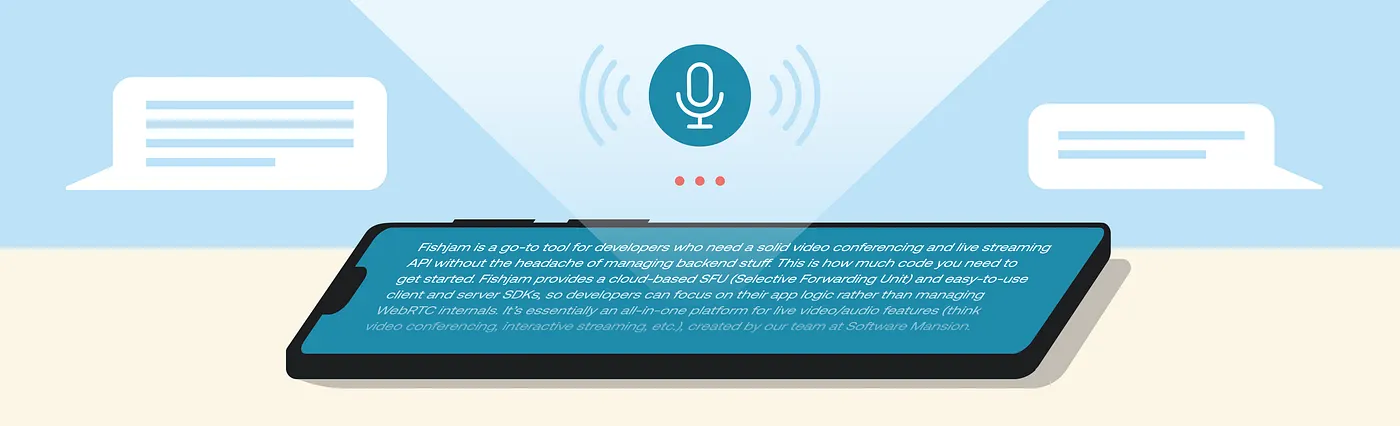

Picture a lively dinner party: glasses clinking, half-finished sentences, and three people laughing at the same time. To a human, navigating this is instinctual. To an AI, it is a nightmare. We have effectively mastered the predictable flow of a one-on-one chat. But handling a group conversation, where people interrupt and talk over each other, is much more difficult.
Together with the Fishjam team, we set out to showcase our Selective Forwarding Unit solution by building a unique demo app that solves this problem. That’s how the Deep Sea Stories game came to life.
The premise is simple: a group of detectives enters a conference room to solve a mystery. The twist? The “Riddle Master”, the entity that knows the secret solution and answers questions is actually a Gemini Voice AI Agent. This required the agent to listen, understand, and respond to a group of users in real-time.
The Anatomy of a Voice Agent
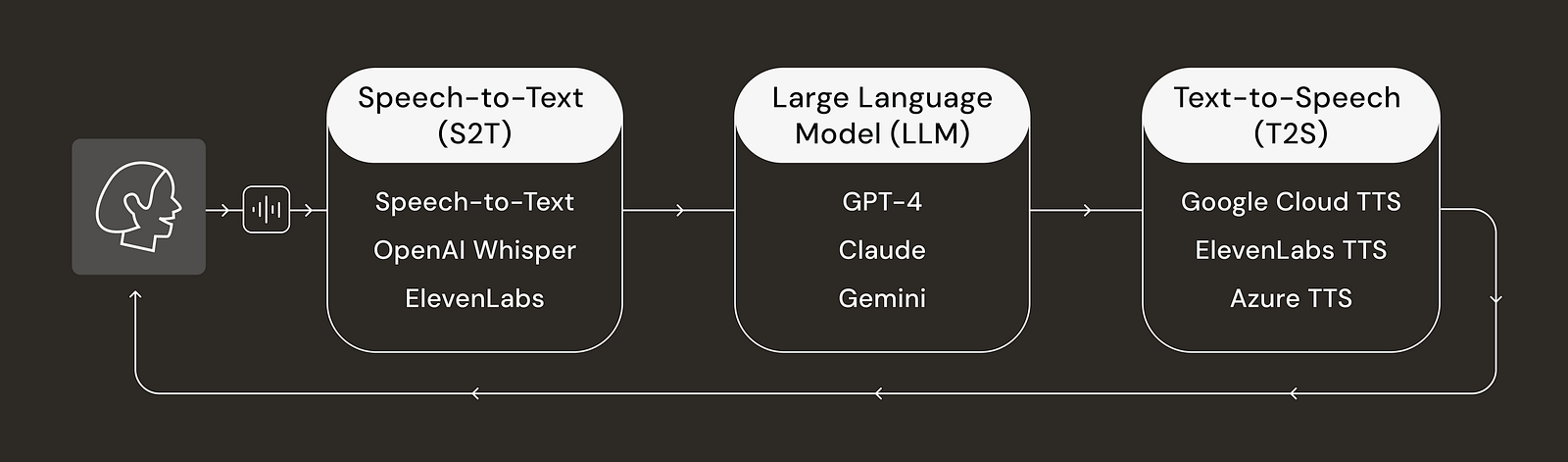
First, let’s look at how an AI Voice Agent typically processes data. It typically operates through a modular pipeline that includes the following steps:
- Speech-to-Text (S2T): The system converts the user’s spoken input into text using models like Google Speech-to-Text, OpenAI Whisper or ElevenLabs’ transcription service.
- Large Language Model (LLM): The transcribed text is processed by an LLM (e.g. Gemini, GPT-4, Claude) to understand the context and generate an appropriate text response.
- Text-to-Speech (TTS): The text response is converted back into natural-sounding speech using services like Google Cloud TTS, ElevenLabs or Azure TTS.
- Real-time Audio Streaming: The audio is delivered back to the user with minimal latency.
A second architecture gaining popularity, and notably used in the newest Gemini Live API models is Speech-to-Speech. Unlike traditional pipelines that convert speech to text and back again, this architecture feeds raw audio directly into the model and generates audio output in a single step. This unified approach not only reduces latency but also preserves non-verbal features, enabling the model to recognize and replicate subtle human emotions, tone, and pacing with high fidelity.
One-to-One vs. Group Contexts
Most standard SDKs make setting up a one-on-one conversation relatively simple. For example, using the Gemini Live API SDK:
const { GoogleGenAI } = require("@google/genai");

// 1. Setup
const ai = new GoogleGenAI({ apiKey: "YOUR_API_KEY" });

async function startAgent() {
  // 2. Connect
  const session = await ai.live.connect({
    model: "gemini-2.5-flash-native-audio-preview-12-2025",
    config: { responseModalities: ["AUDIO"] },
  });

  console.log("Agent Connected!");

  // 3. Listen for the Agent's Voice
  session.receive(async (msg) => {
    // This loop runs every time the AI sends an audio chunk
    if (msg.serverContent?.modelTurn?.parts) {
      const audioData = msg.serverContent.modelTurn.parts[0].inlineData.data;
      console.log(`Received Audio Chunk (${audioData.length} bytes)`);
      // In a real app, you would send 'audioData' to your audio output device
    }
  });

  // 4. Send Your Voice (Simulated)
  // Real apps pipe microphone data here continuously
  console.log("Sending audio...");
  await session.sendRealtimeInput([
    {
      mimeType: "audio/pcm;rate=16000",
      data: "BASE64_ENCODED_PCM_AUDIO_STRING_GOES_HERE",
    },
  ]);
}

startAgent();
However, these SDKs assume a single audio input stream. In a conference room, audio streams are distinct, asynchronous, and overlapping. We had to determine how to aggregate these inputs for the Riddle Master without losing context or introducing unacceptable latency.
We evaluated three specific architectural strategies to handle the multi-speaker environment:
- Server-Side Aggregation: This method involves mixing all player audio streams into a single channel before sending it to the AI Agent. While simple to implement, mixing audio makes it incredibly difficult for the Speech-to-Text (S2T) model to transcribe accurately, especially when users talk over one another. This results in “hallucinations” or missed queries.
- Agent per Client: This approach assigns a separate Voice AI agent to every single player in the room. This creates a chaotic user experience (all agents speaking at once) and prevents a shared game state. It is also cost-prohibitive, as every user stream consumes separate processing tokens.
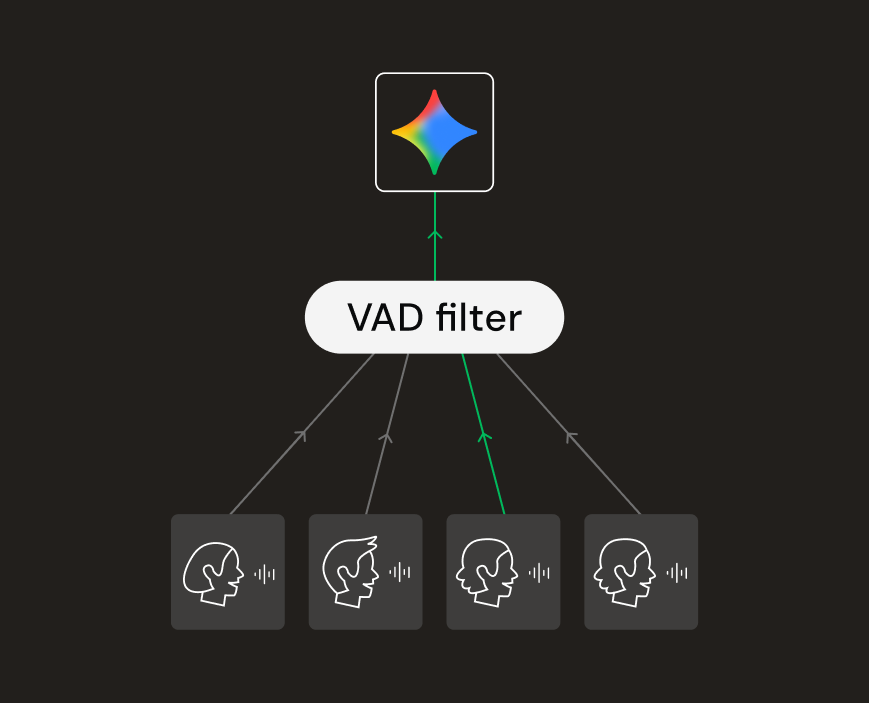
- Server-Side Filtering using VAD: In this approach, we implemented a centralized gatekeeper using Voice Activity Detection (VAD). We wait for a player to speak, lock the “input slot” and forward only that specific player’s audio to the AI agent. Once they stop speaking, the lock is released, allowing another player to ask questions. This is the solution we finally went with.
Beyond One-on-One: A “Deep Sea Stories” Game Web App
Key Technologies
- Fishjam: A real-time communication platform handling peer-to-peer audio streaming via WebRTC (SFU). (Not familiar with WebRTC/SFUs? Check out our guide)
- Gemini GenAI Voice Agent: Provides an easy SDK that makes creating voice agents and initializing audio conversations simple.
Architecture Overview
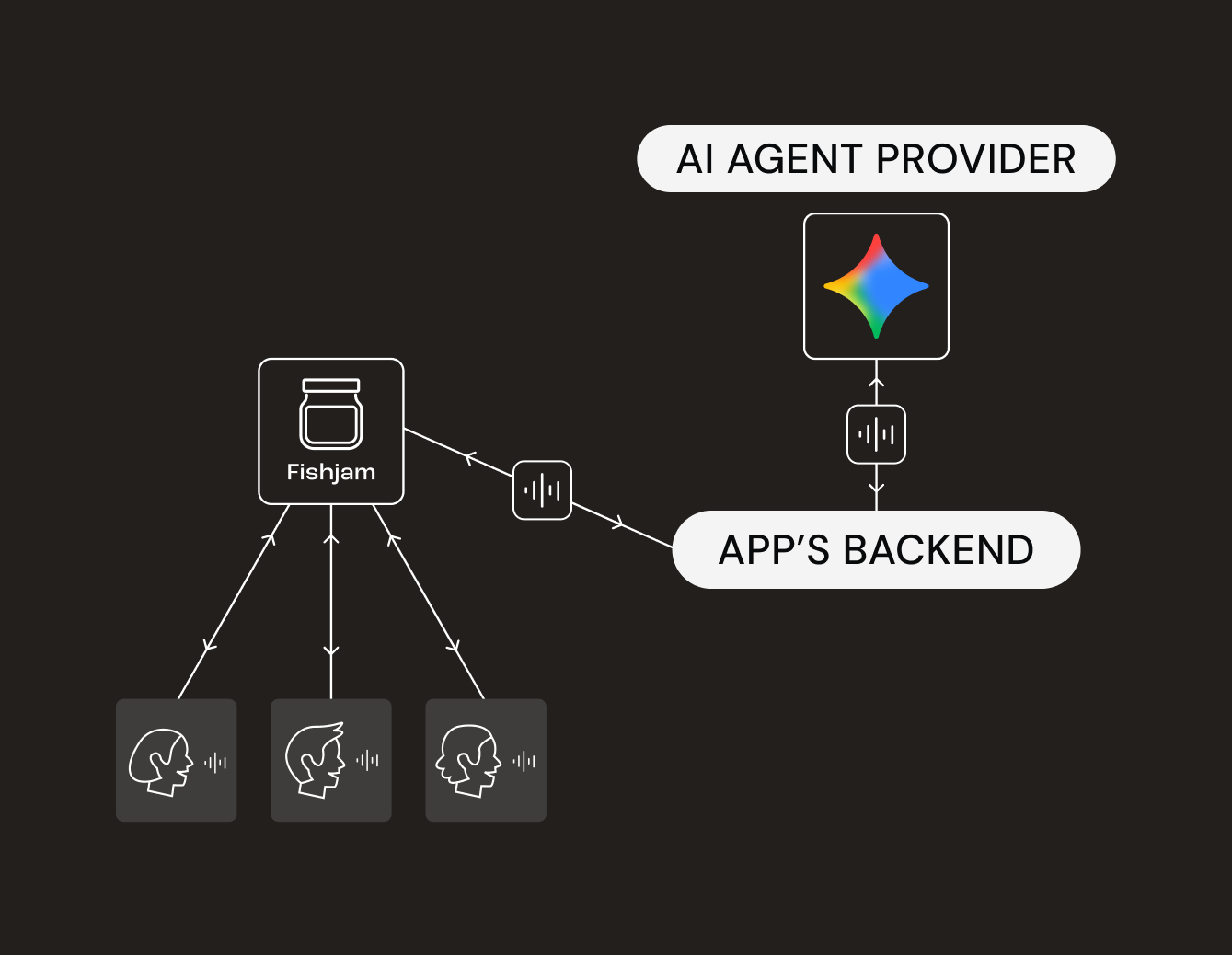
The game logic is handled on the backend, which manages the conferencing room and peer connections.
- Player Connection: When players join the game using the frontend client, they connect audio/video via the Fishjam Web SDK. (See: Fishjam React Quick Start).
- The Bridge: When the game starts, the backend creates a Fishjam Agent. This agent acts like a “ghost peer” in the audio-video room; its sole purpose is to capture audio of the players and forward it to the AI, and vice versa.
- The Brain: The backend initiates a WebSocket connection with the Gemini agent and forwards the audio stream from players to Gemini and vice versa.
Implementation Details
1. Initializing Clients and game room
import { FishjamClient } from '@fishjam-cloud/js-server-sdk';
import GeminiIntegration from '@fishjam-cloud/js-server-sdk/gemini';

const fishjamClient = new FishjamClient({
  fishjamId: process.env.FISHJAM_ID!,
  managementToken: process.env.FISHJAM_TOKEN!,
});

const genAi = GeminiIntegration.createClient({
  apiKey: process.env.GOOGLE_API_KEY!,
});

const gameRoom = await fishjamClient.createRoom();
2. Creating the Fishjam Agent
When the first player joins the game room, we create the Fishjam agent to capture players’ audio on the backend.
import GeminiIntegration from "@fishjam-cloud/js-server-sdk/gemini";

const { agent } = await fishjamClient.createAgent(gameRoom.id, {
  subscribeMode: "auto",
  // Use our preset to match the required audio format (16kHz)
  output: GeminiIntegration.geminiInputAudioSettings,
});
// agentTrack enables to send audio back to players
const agentTrack = agent.createTrack(
  GeminiIntegration.geminiOutputAudioSettings,
);
3. Configuring and Initializing the AI Riddle Master
When users select a story scenario, we configure the Gemini agent with the specific context (the riddle solution and the “Game Master” persona).
const session = await genAi.live.connect({
  model: GEMINI_MODEL,
  config: {
    responseModalities: [Modality.AUDIO],
    systemInstruction:
      "here's the story: ..., and its solution: ... you should answer only yes or no questions about this story",
  },
  callbacks: {
    // Gemini -> Fishjam
    onmessage: (msg) => {
      if (msg.data) {
        // send Riddle Master's audio responses back to players
        const pcmData = Buffer.from(msg.data, "base64");
        agent.sendData(agentTrack.id, pcmData);
      }

      if (msg.serverContent?.interrupted) {
        console.log("Agent was interrupted by user.");
        // Clears the buffer on the Fishjam media server
        agent.interruptTrack(agentTrack.id);
      }
    },
  },
});
4. Bridging Audio (The Glue)
The final piece of the puzzle is the bridge between the SFU and the AI. We capture audio streams from the Fishjam agent (what the players are saying) and pass them through a custom VAD (Voice Activity Detection) filter. This filter implements a “mutex” lock mechanism: it identifies the first active speaker, locks the channel to their ID, and forwards only their audio to Gemini. All other simultaneous audio is ignored until the active speaker finishes their turn.
Below is the simplified code of this logic:
// State to track who currently "holds the floor"
let activeSpeakerId: string | null = null;

// We capture audio chunks from ALL players in the room
agent.on("audioTrack", (userId, pcmChunk) => {
  vadService.process(userId, pcmChunk);
});

// VAD Processor Logic
vadService.on("activity", (userId, isSpeaking, audioData) => {
  if (activeSpeakerId === null && isSpeaking) {
    activeSpeakerId = userId; // Lock the floor
  }

  // We only forward audio if it comes from the person holding the lock
  if (userId === activeSpeakerId) {
    voiceAgentSession.sendAudio(audioData);

    // If the active speaker stops speaking (silence detected), release the lock
    if (!isSpeaking) {
      // (Optional: Add a debounce delay here to prevent cutting off pauses)
      activeSpeakerId = null;
    }
  }
});
Challenges in group AI
Building a multi-user voice interface introduces unique challenges compared to 1-on-1 chats:
- Floor Control: Standard Speech-to-Text models can struggle when multiple players speak simultaneously. Determining which player the AI should respond to or if it should simply listen requires careful handling.
- Latency: Real-time responsiveness is critical for immersion. The entire pipeline (Audio → Text → LLM → Audio) must execute in milliseconds.
- Audio Quality: Maintaining clear audio through transcoding and streaming across different networks is essential.
Fortunately, Fishjam’s WebRTC implementation largely solves the latency and audio quality issues. The challenges of Floor Control needed carefully structured implementation on the backend, but it was not really that hard!
Try the Game Yourself!
We have implemented the functionality described above in a live demo. Gather your friends and try to solve a mystery with our AI Riddle Master!
- Play the Demo: Deep Sea Stories
- View the Code: GitHub Repository
If you are working on AI-based features with real-time video or audio and need assistance, feel free to reach out to us on Discord.